
SharePoint 2016 Cumulative Updates: June 2017

The June 2017 Cumulative Updates contain fixes and improvements for SharePoint Server 2016 and Office Online Server 2016.

Installation instructions

  • Create a SharePoint Farm Backup.
  • Download all SharePoint Server packages.
  • Extract the previously downloaded files with a double-click.
  • Click "Continue"
  • Define the path in which you would like to extract the installation binaries and click OK. Use the same destination path for the other files.
  • Run the extracted EXE file as administrator.
  • Accept the license terms and click "Continue".
  • Repeat the previous two steps for the other EXE files in this folder.
  • Apply the updates to each SharePoint server in the farm.
  • As soon as the installation of the cumulative update has finished on all servers, run the SharePoint Configuration Wizard successively on each SharePoint server in the farm.

Update KB3203432 for SharePoint Server 2016: June 13, 2017
This fix contains updates for language-independend files. It also updates the configuration database schema and the SharePoint build number.
Download
Description of the SharePoint Server 2016 update package
Read more


SharePoint 2013 Cumulative Updates: June 2017

The June 2017 Cumulative Updates contain numerous hotfixes and improvements for SharePoint Foundation 2013, SharePoint Server 2013, Project Server 2013 and Office Web Apps Server 2013. The cumulative update package is multilingual and contains updates for all languages.

Before you start
Since June 2014 the Cumulative Updates for SharePoint products releases on a monthly basis.
Since May 2015 the server proofing tools are included in the cumulative updates.
This cumulative update includes all patches since the Service Pack 1 release, but not the Service Pack 1 itself. You must install the Service Pack 1 before installing this cumulative update. Read how-to install Service Pack 1.
Because of the file size the cumulative update package has been divided in three parts; ubersrv.exe, ubersrv_1.cab and ubersrv_2.cab. You have to put them all in the same folder.

This CU solves the following issue:
The March 2017 CU prevents opening Word documents in Office Web Apps Server if the site where the document is stored contains spaces in its name.

Installation instructions

  • Create a SharePoint Farm Backup.
  • Download all SharePoint Foundation and SharePoint Server packages.
  • Extract the previously downloaded files with a double-click.
  • Click "Continue"
  • Define the path in which you would like to extract the installation binaries and click OK. Use the same destination path for the other files.
  • Run the extracted EXE file as administrator.
  • Accept the license terms and click "Continue".
  • Repeat the previous two steps for the other EXE files in this folder.
  • Apply the updates to each SharePoint server in the farm.
  • As soon as the installation of the cumulative update has finished on all servers, run the SharePoint Configuration Wizard successively on each SharePoint server in the farm. This step is required if your farm level is lower than July 2015 CU.
  • Restart the User Profile Service on affected servers.

Hotfix KB3203428 for SharePoint Foundation 2013: June 13, 2017
Download
Description of the SharePoint Foundation 2013 update package
Read more


SharePoint 2010 Cumulative Updates: June 2017

The June 2017 Cumulative Updates contain numerous hotfixes and improvements for SharePoint Server 2010 and Project Server 2010. The cumulative update package is multilingual and contains updates for all languages.

Before you start
Since June 2014 the Cumulative Updates for SharePoint products releases on a monthly basis!
Be aware that the cumulative update requires the Service Pack 2 to be installed. This Cumulative Update does not support Service Pack 1. The SharePoint Server 2010 cumulative update contains all resources of SharePoint Foundation 2010 since the release of Service Pack 2.

Installation instructions

  • Make sure you already installed and configured the Service Pack 2.
  • Create a SharePoint Farm Backup.
  • Download all SharePoint Foundation and SharePoint Server packages.
  • Extract the previously downloaded files with a double-click.
  • Click "Continue"
  • Define the path in which you would like to extract the installation binaries and click OK. Use the same destination path for the other files.
  • Run the extracted EXE file as administrator.
  • Accept the license terms and click "Continue".
  • Repeat the previous two steps for the other EXE files in this folder.
  • Apply the updates to each SharePoint server in the farm.
  • As soon as the installation of the cumulative update has finished on all servers, run the SharePoint Configuration Wizard successively on each SharePoint server in the farm.
  • Restart the User Profile Service on affected servers.

No fixes released for SharePoint Foundation 2010
Read more


Azure DevTest Labs at Experts Live Switzerland

I had the chance to deliver a session about "Azure DevTest Labs: Schnell und günstig zur Testumgebung" (German) at Experts Live Switzerland. This 1-day conference took place on May 17, 2017 in the newly built Welle 7 in Bern. The event had its focus on topics such as cloud platform, cloud productivity, datacenter management, workplace management, security and compliance.

This session in a summary: Development and test environments have always been time-consuming and costly. With the Azure DevTest Labs, this fact is taken into account. Development and test environments can be deployed quickly and cost-effectively, without the involvement of the IT department. Costs can be controlled automatically by shutting down the servers and by limiting the available resources.

View my slides for more details about "Azure DevTest Labs: Schnell und günstig zur Testumgebung":

 
This session has also been recorded:
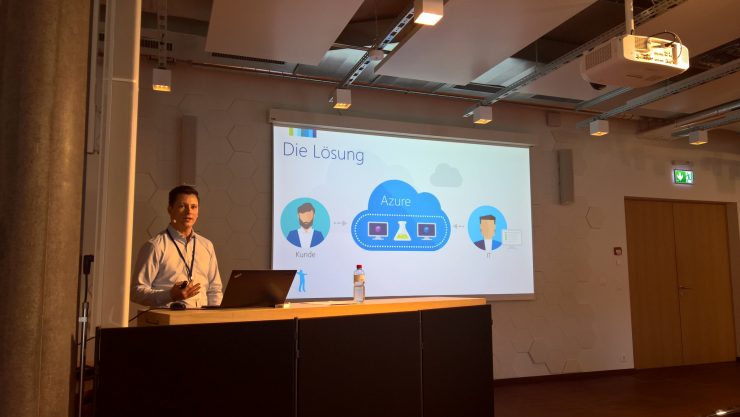
 
Roger Haueter about Azure DevTest Labs at Experts Live Switzerland

 
Roger Haueter about Azure DevTest Labs at Experts Live Switzerland

 
Roger Haueter about Azure DevTest Labs at Experts Live Switzerland


SharePoint Saturday Zurich slide deck

The Swiss SharePoint and Dynamics CRM communities pooled their strengths to make the first "SharePoint & CRM Saturday Zurich" happen on May 13, 2017. With more than 110 registrations this event was sold out and a huge success! Special thanks to our 15 sponsors, 19 speakers from throughout Europe, including 10 Microsoft Most Valuable Professionals, the attendees and Microsoft for supporting us.

Beside being co-organizer of the first SharePoint Saturday Zurich I also had the chance to deliver a session about "SharePoint 2016 architecture and sizing". Here's the session excerpt:
The implementation of a new SharePoint farm can quickly become a big challenge in a complex IT environment. SharePoint is intended to be seamlessly integrated into the existing infrastructure, to be accessible externally, to obtain information from other systems, to be quick and fail-safe. The IT department is challenged to translate these vague ideas into technical parameters to meet the business requirements. I will show you where to start and how to design a fast, reliable and sustainable SharePoint farm on-premises, hybrid or in the cloud.

Check my slide deck for more details about SharePoint 2016 architecture and sizing:

 
SharePoint Saturday Zurich: SharePoint 2016 architecture and sizing

 
SharePoint Saturday Zurich: SharePoint 2016 architecture and sizing

 
Preparing my session at SharePoint Saturday Zurich