



SharePoint Server 2016 (on-premises) news and features
Microsoft celebrated the product launch of SharePoint Server 2016 on May 4th with an event called "The Future of SharePoint". It was a great show with many announcements. "SharePoint is back!" and it will not be the last on-prem release - a bold message by Microsoft. Because of this and to show how important SharePoint is, Microsoft decided to rename "Sites" in Office 365 to "SharePoint". And this is, where the confusion could start. Microsoft showed so many new features coming on SharePoint, but actually nearly all of them are coming to SharePoint Online (Office 365). Some of them - most likely UI enhancements and hybrid improvements - may also come to SharePoint Server 2016 (the On-Premises release). For this reason a new type of updates is introduced in SharePoint Server 2016 - Feature Packs will push new features from the cloud to your on-prem server without waiting for a new SharePoint on-prem Version.
Ok, let's see what's new in SharePoint Server 2016 (on-premises release):
Infrastructure
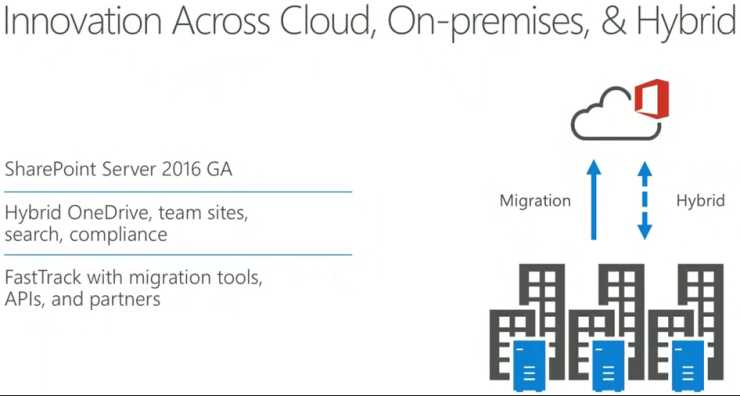
- SharePoint Server 2016 has the same code base as SharePoint Online and is the foundation release for getting hybrid-ready.
- The new MinRole concept is cloud inspired and focuses in managing the server roles rather than the services. The available server roles are: Front-end, Application, Distributed Cache and Search. Each server role has to be configured on its on server and cannot be combined with a second role. This means you need at least 4 SharePoint servers for a multi server farm when using MinRole. As an alternative you may use the custom role, which allows to configure the services for your needs. The last role is the Single-Server Farm which runs all SharePoint services on one server.
- Update packages are smaller and more streamlined. The update process can occur without taking the entire farm offline (zero downtime patching).
- Some of the new features and frameworks on SharePoint Online (Office 365) will also be provided to SharePoint Server 2016 customers with Software Assurance through Feature Packs. Rumors indicate the release of the first feature pack between fall 2016 and early 2017. In my opinion most likely hybrid features, api enhancements and new ui features will be pushed from the cloud to on-prem but not Office 365 Groups, Office Graph and other cloud-based features.
- Two changes worth mentioning from the hardware side are the additional data disk and the increased RAM requirements. Details can be found here: https://technet.microsoft.com/en-us/library/cc262485(v=office.16).aspx
- The minimal software requirements are Windows Server 2012 R2 Standard or Datacenter and SQL Server 2014 Service Pack 1.
User Interface
- The user interface and the ribbon have been updated to match Office 365. This consistent experience makes it easier to swap between the platforms when using hybrid.
- Microsoft invested in HTML5 to provide capabilities for device-specific content delivery, but the mobile experience is still limited, although there is a new touch friendly UI.
- OneDrive for Business is getting more and more important for SharePoint. The look and the functions on document libraries and OneDrive are getting closer.
- The new sync client also solves many problems when using offline sync.
- A big improvement is the document handling which now supports files up to 10 GB, file names with (some) special characters and file names with more than 128 characters.
- The list view limit has been increased to more than 5000 elements.
- Support for Open Document Format (ODF)
- Durable Links can be used when connecting the SharePoint Server with your Office Online Server (Office Web Apps), both on-prem. The url to your document still contains the path but gets also an ID appended at the end of the URL. With this ID you can open your Files even if they have been moved to another location. A durable link url looks like this: https://yoursharepoint/site/doclib/filename.docx?d=z154g2dce216j46897o8m4x3g3971352df
Hybrid
- The hybrid deployment is much easier and can be done using a wizard. With one exception: The Cloud Hybrid Search has still to be configured using PowerShell.
- The App Launcher can be extended with tiles from your on-prem or SharePoint Online to the navigation easier between those platforms.
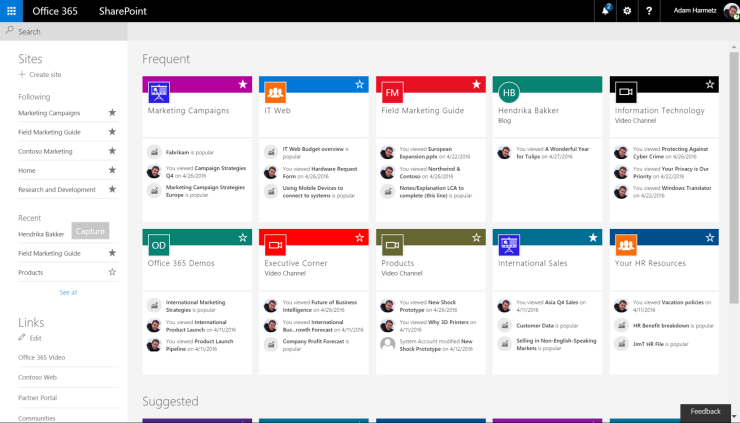
- Sites can be created and followed on-prem and on SharePoint Online. When you click on the "Websites" tile you'll see all your followed ressources from both platforms in the same place.
- The MySite and OneDrive can be moved to SharePoint Online to use Delve Profile and the new and enhanced OneDrive with all its great features.
- The Cloud Hybrid Search Service Application provides an unified index and enables authenticated users to search from SharePoint Online or on-prem and return results that include items from both on-premises and online. That's my favorite!
Supportability and migration and updates
- It's still possible to host InfoPath Forms Services and its supported for the duration of SharePoint 2016's support lifecycle.
- InfoPath 2013 and SharePoint Designer 2013 will be the last product versions, but custom workflows built with SharePoint Designer and hosted on SharePoint Server 2016 and Office 365 are still supported until 2026.
- Support for SharePoint Server 2016 is running until 2026.
- An inplace upgrade from SharePoint Server 2013 (or any other version) to SharePoint Server 2016 is not possible. From 2013 to 2016 you can attach the content databases. Most of your 2013 solutions should also work on SharePoint Server 2016.
The new SharePoint mobile app
The new SharePoint Mobile App for iOS, Android and Windows Phone gets you access to your SharePoint site, frequent used sites, company news, announcements, people and apps. The app will work for SharePoint Online as well as SharePoint on-prem.
SharePoint Insights
The SharePoint Insights hybrid feature will be shipped to SharePoint Server 2016 on-prem later this year. SharePoint Insights consolidates audit and compliance in one place.
Interested in what's coming in the future? Read this post about The Future Of SharePoint (Online)
The Future of SharePoint (Online)
Microsoft celebrated the product launch of SharePoint Server 2016 on May 4th with an event called "The Future of SharePoint". It was a great show with many announcements. "SharePoint is back!" and it will not be the last on-prem release - a bold message by Microsoft. Because of this and to show how important SharePoint is, Microsoft decided to rename "Sites" in Office 365 to "SharePoint".
Ok, let's see what's coming to SharePoint Online (the cloud release in Office 365):
SharePoint Home
SharePoint home is a central entry page to access your cloud and on-premises SharePoint sites.
Modern team sites
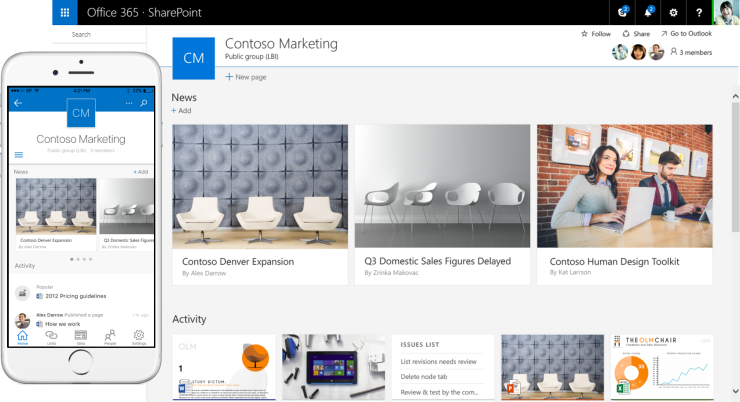
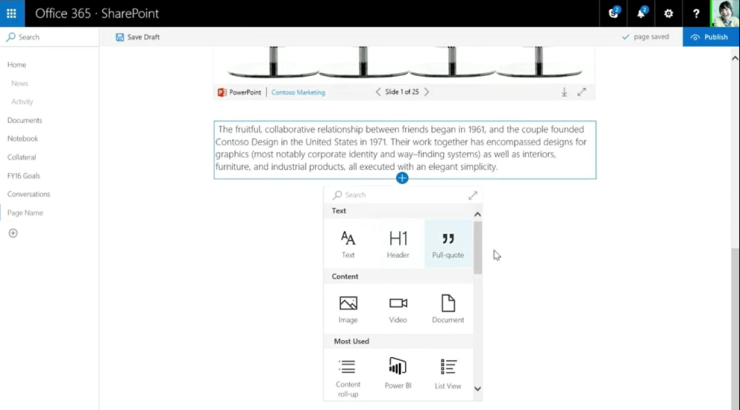
Modern team sites combine the power of SharePoint team sites with Office 365 Groups. When you create a team site a corresponding Office 365 Group is also provisioned to manage the membership of this site. You'll get a personalized page with news and activity using the power of Office Graph. Libraries and lists come with an intuitive user experience and rich metadata. Modern team sites are responsive and can be customized by embedding Sway, Video, PowerPoints or a Calender.
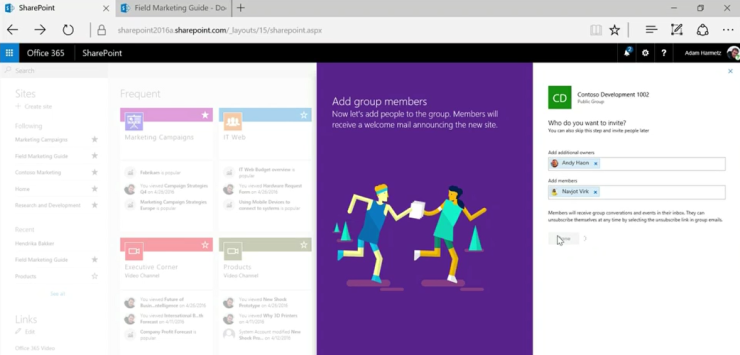
Microsoft Flow and PowerApps
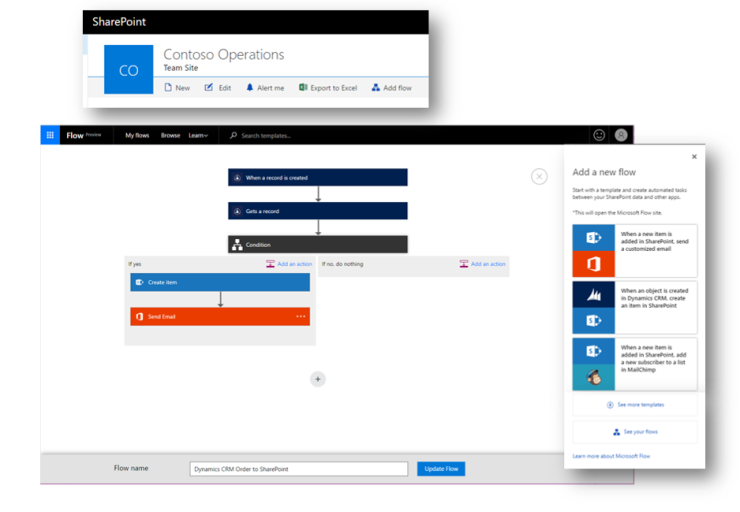
Microsoft Flow automates workflows across apps and SaaS services. Microsoft Flow can also be used to access, share and collaborate structured data in your SharePoint lists to exchange it with other services.
PowerApps is a web-based service which you can use to create and share business apps in minutes. The integration of PowerApps in modern team sites enables you to utilize SharePoint lists and libraries as a data source.
Roadmaps
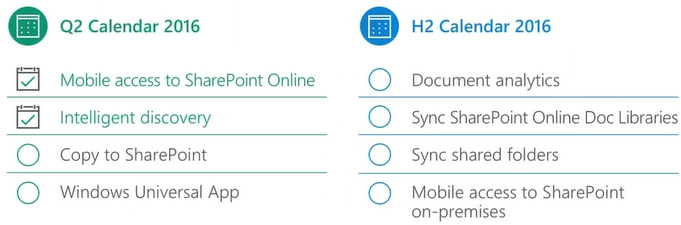
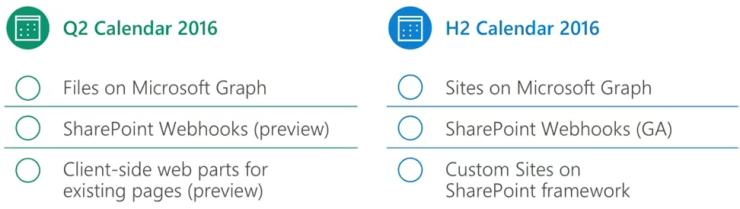
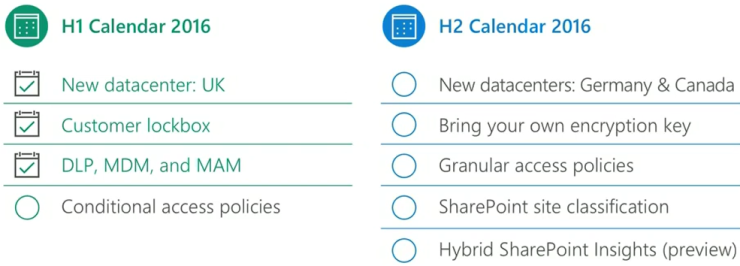
Microsoft presented the following roadmaps to show availability of certain features. The green checkmark means the features is available today.
File access and sharing roadmap
Mobile and intelligent intranet roadmap
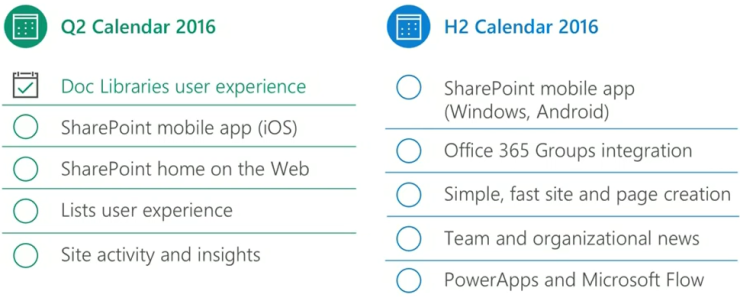
Open and connected platform roadmap
Security, privacy and compliance roadmap
Interested in what's new in SharePoint Server 2016? Read this post: SharePoint Server 2016 (on-premises) news and features