
No Content Databases in the Web Application were available to store your Site Collection

For testing purposes I deleted a Site Collection and tried to restore it in the same Content Database using the Restore-SPSite cmdlet. But then I got the following error message:

Sorry, something went wrong
The operation that you are attempting to perform cannot be completed successfully. No content databases in the web application were available to store your site collection. The existing content databases may have reached the maximum number of site collections, or be set to read-only, or be offline, or may already contain a copy of this site collection. Create another content database for the Web application and then try the operation again.

Read more


List all Site Collections in a Farm and show in which Content DBs they are stored

In some cases, for example when analyzing or optimizing the distribution of Site Collections in a SharePoint farm, it may be helpful to see which Site Collections are stored in which Content Databases. This can easily achieved by using this SharePoint Management Shell cmdlet:

Read more


SharePoint 2016 Cumulative Updates: February 2017

The February 2017 Cumulative Updates contain fixes and improvements for SharePoint Server 2016 and Office Online Server 2016.

Installation instructions

  • Create a SharePoint Farm Backup.
  • Download all SharePoint Server packages.
  • Extract the previously downloaded files with a double-click.
  • Click "Continue"
  • Define the path in which you would like to extract the installation binaries and click OK. Use the same destination path for the other files.
  • Run the extracted EXE file as administrator.
  • Accept the license terms and click "Continue".
  • Repeat the previous two steps for the other EXE files in this folder.
  • Apply the updates to each SharePoint server in the farm.
  • As soon as the installation of the cumulative update has finished on all servers, run the SharePoint Configuration Wizard successively on each SharePoint server in the farm.

Update KB3141515 for SharePoint Server 2016: February 21, 2017
This fix contains updates for language-independend files. It also updates the configuration database schema and the SharePoint build number.
Download
Description of the SharePoint Server 2016 update package
Read more


The source files could not be found for .Net Framework 3.5 Features

While running the Microsoft SharePoint 2013 Products Prepartion Tool (also known as Prerequisites Installer or prerequisiteinstaller.exe) on a Windows Server 2012 R2 machine the following error message appeared:

There was an error during installation.
The tool was unable to install Application Server Role, Web Server (IIS) Role.

This error appeared because the Prerequisites Installer was trying to install the .NET Framework 3.5 feature, but Windows Server 2012 R2 couldn't find the required binaries. This is a known error and may be solved by moving over to the Server Manager, clicking through the feature installation and specifying an alternate source path as described here:
SharePoint 2016: Unable to install Application Server Role, Web Server (IIS) Role
SharePoint 2013: Unable to install Application, Web Server (IIS) Role

the-source-files-could-not-be-found

But that didn't solve the issue this time.
Read more


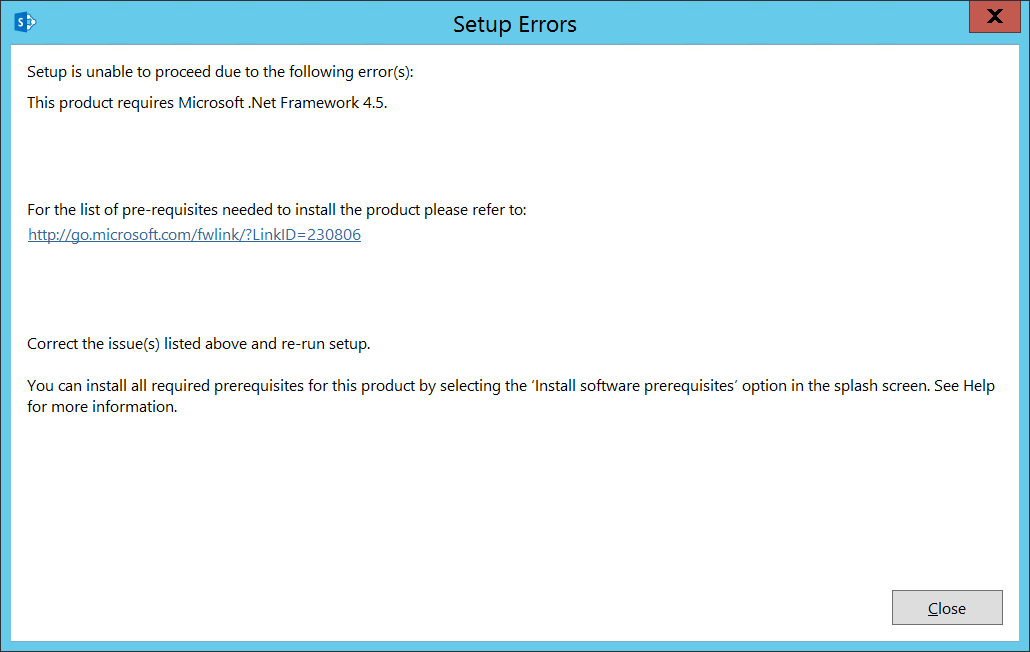
SharePoint setup error: This product requires Microsoft .NET Framework 4.5

When I was trying to install SharePoint Server 2016 (this also applies to SharePoint 2013) on a Windows Server 2012 R2 machine I got this error message:

Setup is unable to proceed due to the following error(s):
This product requires Microsoft .Net Framework 4.5.
this-product-requires-dot-net-4-5

Read more