



Januar 12, 2017
SharePoint 2016 Cumulative Updates: January 2017
The January 2017 Cumulative Updates contain fixes and improvements for SharePoint Server 2016 and Office Online Server 2016.
Installation instructions
- Create a SharePoint Farm Backup.
- Download all SharePoint Server packages.
- Extract the previously downloaded files with a double-click.
- Click "Continue"
- Define the path in which you would like to extract the installation binaries and click OK. Use the same destination path for the other files.
- Run the extracted EXE file as administrator.
- Accept the license terms and click "Continue".
- Repeat the previous two steps for the other EXE files in this folder.
- Apply the updates to each SharePoint server in the farm.
- As soon as the installation of the cumulative update has finished on all servers, run the SharePoint Configuration Wizard successively on each SharePoint server in the farm.
Update KB3141486 for SharePoint Server 2016: January 10, 2017
This fix contains updates for language-independend files. It also updates the configuration database schema and the SharePoint build number.
Download
Description of the SharePoint Server 2016 update package
Read more
Januar 12, 2017
SharePoint 2013 Cumulative Updates: January 2017
The January 2017 Cumulative Updates contain numerous hotfixes and improvements for SharePoint Foundation 2013, SharePoint Server 2013, Project Server 2013 and Office Web Apps Server 2013. The cumulative update package is multilingual and contains updates for all languages.
Before you start
Since June 2014 the Cumulative Updates for SharePoint products releases on a monthly basis.
Since May 2015 the server proofing tools are included in the cumulative updates.
This cumulative update includes all patches since the Service Pack 1 release, but not the Service Pack 1 itself. You must install the Service Pack 1 before installing this cumulative update. Read how-to install Service Pack 1.
Because of the file size the cumulative update package has been divided in three parts; ubersrv.exe, ubersrv_1.cab and ubersrv_2.cab. You have to put them all in the same folder.
Installation instructions
- Create a SharePoint Farm Backup.
- Download all SharePoint Foundation and SharePoint Server packages.
- Extract the previously downloaded files with a double-click.
- Click "Continue"
- Define the path in which you would like to extract the installation binaries and click OK. Use the same destination path for the other files.
- Run the extracted EXE file as administrator.
- Accept the license terms and click "Continue".
- Repeat the previous two steps for the other EXE files in this folder.
- Apply the updates to each SharePoint server in the farm.
- As soon as the installation of the cumulative update has finished on all servers, run the SharePoint Configuration Wizard successively on each SharePoint server in the farm. This step is required if your farm level is lower than July 2015 CU.
- Restart the User Profile Service on affected servers.
Hotfix KB3141479 for SharePoint Foundation 2013: January 10, 2017
Download
Description of the SharePoint Foundation 2013 update package
Read more
Januar 10, 2017
SharePoint 2016 MinRole: Endpoint Failure when trying to invoke a Service Application
The release of SharePoint Server 2016 comes with an important change from an infrastructure point of view: The MinRole concept. While with SharePoint Server 2013 the Streamlined Topologies were state of the art, it now changed to the MinRole concept based on server roles. The role of a server is specified when you create a new farm or join a server to an existing farm. SharePoint automatically configures the services on each server based on the server's role. And this is where an undocumented change has its impact. While in SharePoint 2013 it was suggested to have the Central Administration on a Web Front-end Server you probably started the installation process with this server because you wanted to be able to access the Central Administration afterwards. When installing a SharePoint 2016 multi-server farm this procedure won't work anymore.
If you start an SharePoint Server 2016 farm installation with the Web Front-end role you will get the following error:
A failure was reported when trying to invoke a service application: EndpointFailure
Service Application Uri: urn:schemas-microsoft-com:sharepoint:service:6f0278ab61144ef2944089beda8d7840#authority=urn:uuid:4faf6f9591914a41aff51d3197f89407&authority=https://webfrontendserver:32844/Topology/topology.svc
Affected Endpoint: http://webfrontendserver:32843/6f0278ab61144ef2944089beda8d7840/MetadataWebService.svc
SharePoint is not able to provision other Service Application as for example the Managed Metadata Service Application because the Topology service is not available on the Web Front-end server. But the Topology service is mandatory to complete this action.
Januar 6, 2017
Microsoft SharePoint Foundation administration tool has stopped working
When I was running the setup.exe to install the SharePoint Server 2016 with SP1 I got this strange error right at the end of the installation process:
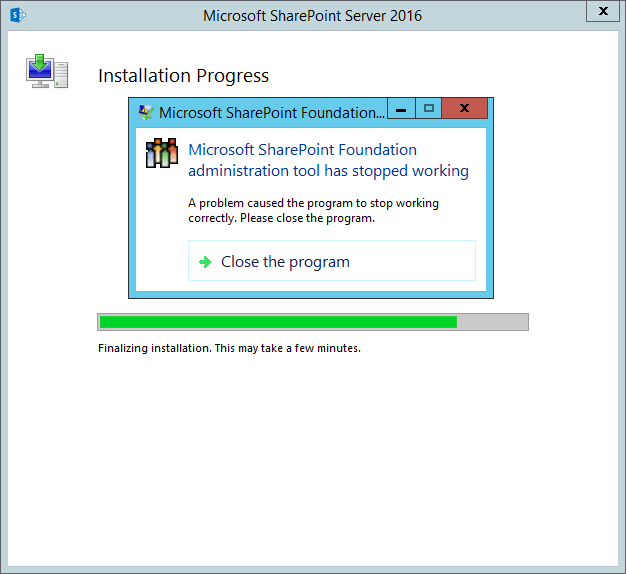
Microsoft SharePoint Foundation administration tool has stopped working
Dezember 14, 2016
SharePoint 2016 Cumulative Updates: December 2016
The December 2016 Cumulative Updates contain fixes and improvements for SharePoint Server 2016 and Office Online Server 2016.
Installation instructions
- Create a SharePoint Farm Backup.
- Download all SharePoint Server packages.
- Extract the previously downloaded files with a double-click.
- Click "Continue"
- Define the path in which you would like to extract the installation binaries and click OK. Use the same destination path for the other files.
- Run the extracted EXE file as administrator.
- Accept the license terms and click "Continue".
- Repeat the previous two steps for the other EXE files in this folder.
- Apply the updates to each SharePoint server in the farm.
- As soon as the installation of the cumulative update has finished on all servers, run the SharePoint Configuration Wizard successively on each SharePoint server in the farm.
Update KB3128014 for SharePoint Server 2016: December 13, 2016
This fix contains updates for language-independend files. It also updates the configuration database schema and the SharePoint build number.
Download
Description of the SharePoint Server 2016 update package
Read more