



Februar 6, 2016
Enable access to social features when using multiple Web Applications
When running multiple Web Applications under different Application Pools (with different Application Pool Users) you should make sure that those Web Applications have access to the MySite Web Application. If they don't have access to the MySites this may cause issues when linking content to the Newsfeed from other Web Applications or when using social features provided by the Work Management Service Application (i.e. Tasks).
You'll get the following error in the Application Log of the Event Viewer:
Log Name: Application
Source: Microsoft-SharePoint Products-SharePoint Foundation
Event ID: 3760
Task Category: Database
Level: Critical
User: NT AUTHORITY\IUSR
Description:
SQL Database 'Content_MySite' on SQL Server instance 'SQLSERVER' not found. Additional error information from SQL Server is included below. Cannot open database "Content_MySite" requested by the login. The login failed. Login failed for user 'DOMAIN\AppPoolUser'.
The solution is to run the following PowerShell command in the SharePoint Management Shell:
$WA = Get-SPWebApplication https://<URL to your MySite Web Application>
$WA.GrantAccessToProcessIdentity("DOMAIN\AppPoolUser")
Februar 6, 2016
Get product previews by activating «First Release» in Office 365
With the first release you'll get product updates as they become available in an early preview stage. Using the standard release you will receive product updates when they are in a final stage and generally available.
By activating the "Frist Release" option in your Office 365 you will receive preview releases of new products and services. To do so:
- Sing in to your Office 365 tenant and navigate to the Office 365 admin center
- Click on Service Settings > Updates on the left
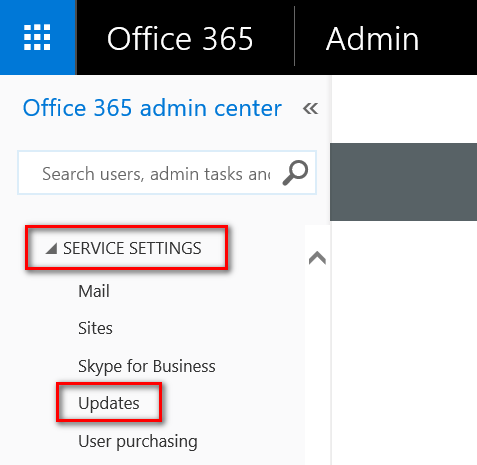
- To enable first release choose Entire organization or Select people. Note: Some of the previews require to enable first release for the entire organization.
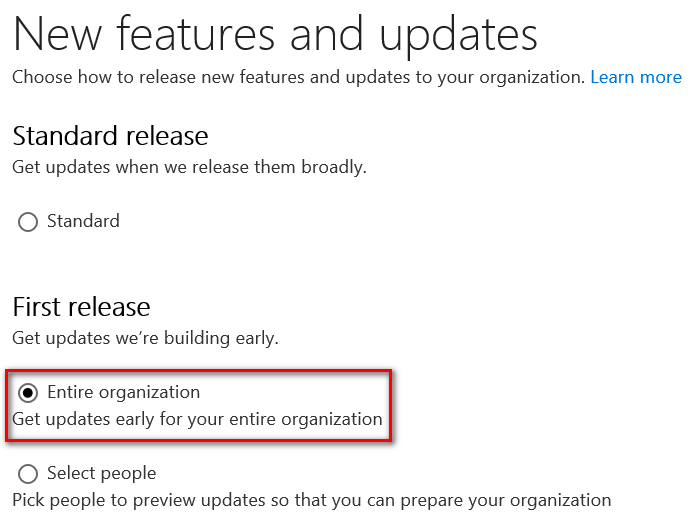
By choosing "some people" you can add users individually by selecting them in the next step or you can bulk add users by uploading a text file.
It can take up to 24 hours to take effect in Office 365.
Januar 20, 2016
SharePoint Server 2016 Release Candidate has been released
Microsoft has released the SharePoint Server 2016 Release Candidate (RC) today. SharePoint Server 2016 RC is mostly feature complete. Please note that this release is just a patch and has to be installed over your existing SharePoint Server 2016 Beta 2 installation. The final release of SharePoint Server 2016 is expected in Spring 2016.
Download SharePoint Server 2016 Release Candidate Patch in English, Chinese, French or German.
Get the SharePoint Server 2016 IT Preview Quick Start Guide for details about system requirements, prerequisites, installation and configuration purposes.
There are also a couple of new and updated SharePoint Server 2016 Release Candidate resources. Also check the SharePoint Server 2016 IT Preview forum on Microsoft TechNet.
Januar 13, 2016
SharePoint 2013 Cumulative Updates: January 2016
The January 2016 Cumulative Update for SharePoint 2013 contains numerous hotfixes and improvements for SharePoint Foundation 2013 and SharePoint Server 2013. The cumulative update package is multilingual and contains updates for all languages.
Important
The October 2015, November 2015 and December 2015 Cumulative Updates were causing problems when using outbound query federation to get results from the SharePoint Online search index. This issue is now fixed with the January 2016 CU.
Before you start
Since June 2014 the Cumulative Updates for SharePoint products releases on a monthly basis.
Since May 2015 the server proofing tools are included in the cumulative updates.
This cumulative update includes all patches since the Service Pack 1 release, but not the Service Pack 1 itself. You must install the Service Pack 1 before installing this cumulative update. Read how-to install Service Pack 1.
Because of the file size the cumulative update package has been divided in three parts; ubersrv.exe, ubersrv_1.cab and ubersrv_2.cab. You have to put them all in the same folder.
Installation instructions
- Create a SharePoint Farm Backup.
- Download all SharePoint Foundation and SharePoint Server packages.
- Extract the previously downloaded files with a double-click.
- Click "Continue"
- Define the path in which you would like to extract the installation binaries and click OK. Use the same destination path for the other files.
- Run the extracted EXE file as administrator.
- Accept the license terms and click "Continue".
- Repeat the previous two steps for the other EXE files in this folder.
- Apply the updates to each SharePoint server in the farm.
- As soon as the installation of the cumulative update has finished on all servers, run the SharePoint Configuration Wizard successively on each SharePoint server in the farm. This step is required if your farm level is lower than July 2015 CU.
- Restart the User Profile Service on affected servers.
Hotfix KB3114492 for SharePoint Foundation 2013: January 12, 2016
Download
Description of the SharePoint Foundation 2013 update package
Hotfix KB3114497 for SharePoint Server 2013: January 12, 2016
Download
Description of the SharePoint Server 2013 update package
Hotfix KB3114493 for Project Server 2013: January 12, 2016
Download
Description of the Project Server 2013 update package
No update for Office Web Apps Server 2013 is available.
SharePoint 2013 update portal
http://technet.microsoft.com/en-us/sharepoint/ee748587.aspx
Januar 13, 2016
SharePoint 2010 Cumulative Updates: January 2016
The January 2016 Cumulative Updates for Project Server 2010 and SharePoint 2010 contains numerous hotfixes and improvements for Project Server 2010, SharePoint Foundation 2010 and SharePoint Server 2010. The cumulative update package is multilingual and contains updates for all languages.
Before you start
Since June 2014 the Cumulative Updates for SharePoint products releases on a monthly basis!
Be aware that the cumulative update requires the Service Pack 2 to be installed. This Cumulative Update does not support Service Pack 1. The SharePoint Server 2010 cumulative update contains all resources of SharePoint Foundation 2010 since the release of Service Pack 2.
If you install the Project Server 2010 hotfixes, you also have to install the SharePoint Server 2010 hotfix. Note: To patch SharePoint Foundation 2010 or SharePoint Server 2010 to the latest build level please install December 2015 Cumulative Updates.
Installation instructions
- Make sure you already installed and configured the Service Pack 2.
- Create a SharePoint Farm Backup.
- Download all SharePoint Foundation and SharePoint Server packages.
- Extract the previously downloaded files with a double-click.
- Click "Continue"
- Define the path in which you would like to extract the installation binaries and click OK. Use the same destination path for the other files.
- Run the extracted EXE file as administrator.
- Accept the license terms and click "Continue".
- Repeat the previous two steps for the other EXE files in this folder.
- Apply the updates to each SharePoint server in the farm.
- As soon as the installation of the cumulative update has finished on all servers, run the SharePoint Configuration Wizard successively on each SharePoint server in the farm.
- Restart the User Profile Service on affected servers.
No update for SharePoint Foundation 2010 is available.
No update for SharePoint Server 2010 is available.
Hotfix KB3114556 for Project Server 2010: January 12, 2016
Download
Description of the Project Server 2010 update package
SharePoint 2010 update portal
http://technet.microsoft.com/en-us/sharepoint/ff800847.aspx