
Juli 17, 2015
SharePoint Server 2016 Public Preview will be released in August 2015
Seth Patton, Senior Director of Product Management for SharePoint and OneDrive, announced at the Microsoft Worldwide Partner Conference that the first public preview of SharePoint Server 2016 will be released next month. That's very surprising because Microsoft postponed the release dates right before the Microsoft Ignite (more information in this post).
Microsoft also announced the release of the Cloud Search Service Application Preview for SharePoint 2013 in August 2015. The new Cloud Search Service Application, which is natively built in SharePoint 2016, crawls on-premises content sources and feeds the Office 365 search index to create a unified search experience for users in hybrid environments.
Juli 16, 2015
SharePoint 2013 Cumulative Updates: July 2015
The July 2015 Cumulative Update for SharePoint 2013 contains numerous hotfixes and improvements for SharePoint Foundation 2013 and SharePoint Server 2013. The cumulative update package is multilingual and contains updates for all languages.
Before you start
Since June 2014 the Cumulative Updates for SharePoint products releases on a monthly basis.
Since May 2015 the server proofing tools are included in the cumulative updates.
This cumulative update includes all patches since the Service Pack 1 release, but not the Service Pack 1 itself. You must install the Service Pack 1 before installing this cumulative update. Read how-to install Service Pack 1.
Because of the file size the cumulative update package has been divided in three parts; ubersrv.exe, ubersrv_1.cab and ubersrv_2.cab. You have to put them all in the same folder.
The July CU changes the database schema for the Search analytics reporting database to support URLs up to 4000 characters. The Search crawler expects an updated database schema and is going to fail if the SharePoint Configuration Wizard (psconfig) hasn't been run right after the installation (follow the installation instructions below).
Installation instructions
- Create a SharePoint Farm Backup.
- Download all SharePoint Foundation and SharePoint Server packages.
- Extract the previously downloaded files with a double-click.
- Click "Continue"
- Define the path in which you would like to extract the installation binaries and click OK. Use the same destination path for the other files.
- Run the extracted EXE file as administrator.
- Accept the license terms and click "Continue".
- Repeat the previous two steps for the other EXE files in this folder.
- Apply the updates to each SharePoint server in the farm.
- As soon as the installation of the cumulative update has finished on all servers, run the SharePoint Configuration Wizard successively on each SharePoint server in the farm.
- Restart the User Profile Service on affected servers.
Hotfix KB3054931 for SharePoint Foundation 2013: July 14, 2015
Download
Description of the SharePoint Foundation 2013 update package
Hotfix KB3054937 for SharePoint Server 2013: July 14, 2015
Download
Description of the SharePoint Server 2013 update package
Hotfix KB3054933 for Project Server 2013: July 14, 2015
Download
Description of the Project Server 2013 update package
Hotfix KB3054930 for Office Web Apps Server 2013: July 14, 2015
Download
Description of the Office Web Apps Server 2013 update package
SharePoint 2013 update portal
http://technet.microsoft.com/en-us/sharepoint/ee748587.aspx
Juli 16, 2015
SharePoint 2010 Cumulative Updates: July 2015
The July 2015 Cumulative Update for SharePoint 2010 contains numerous hotfixes and improvements for SharePoint Foundation 2010 and SharePoint Server 2010. The cumulative update package is multilingual and contains updates for all languages.
Before you start
Since June 2014 the Cumulative Updates for SharePoint products releases on a monthly basis!
Be aware that the cumulative update requires the Service Pack 2 to be installed. This Cumulative Update does not support Service Pack 1. The SharePoint Server 2010 cumulative update contains all resources of SharePoint Foundation 2010 since the release of Service Pack 2.
If you install the Project Server 2010 hotfixes, you also have to install the SharePoint Server 2010 hotfix.
Installation instructions
- Make sure you already installed and configured the Service Pack 2.
- Create a SharePoint Farm Backup.
- Download all SharePoint Foundation and SharePoint Server packages.
- Extract the previously downloaded files with a double-click.
- Click "Continue"
- Define the path in which you would like to extract the installation binaries and click OK. Use the same destination path for the other files.
- Run the extracted EXE file as administrator.
- Accept the license terms and click "Continue".
- Repeat the previous two steps for the other EXE files in this folder.
- Apply the updates to each SharePoint server in the farm.
- As soon as the installation of the cumulative update has finished on all servers, run the SharePoint Configuration Wizard successively on each SharePoint server in the farm.
- Restart the User Profile Service on affected servers.
Hotfix KB3054983 for SharePoint Foundation 2010: July 14, 2015
Download
Description of the SharePoint Foundation 2010 update package
This is a security fix, please refer to SharePoint updates are no longer available through Windows Update
Hotfix KB3054975 for SharePoint Server 2010: July 14, 2015
Download
Description of the SharePoint Server 2010 update package
Hotfix KB3054972 for Project Server 2010: July 14, 2015
Download
Description of the Project Server 2010 update package
Update Portal für SharePoint 2010
http://technet.microsoft.com/en-us/sharepoint/ff800847.aspx
Juli 2, 2015
How to connect to Microsoft Azure using PowerShell
Install the following components on your system to connect to your Microsoft Azure subscription using PowerShell:
Microsoft Online Service Sign-in Assistant for IT Professionals RTW
Select the appropriate version of your OS
Azure Active Directory Module for Windows PowerShell (64-bit version)
The 32-bit version is discontinued by October 20, 2014.
You must be a tenant administrator (i.e. company administrator, global administrator) to successfully establish a connection to your Azure subscription using PowerShell. Read here how to assign admin roles in Azure AD.
You're now ready to connect to your Azure subscription using PowerShell!
- To do so, run the Microsoft Azure PowerShell console as administrator
- Enter the following PowerShell command:
Add-AzureAccount
- You are prompted to enter your Azure credentials:
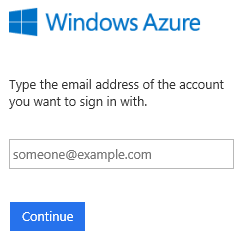
- If you have a work or school account, you can bypass the pop up windows using this command:
$cred = Get-Credential Add-AzureAccount -Credential $cred
- When connecting the first time to your Azure subscription using PowerShell you need to download, save and import your Publishing Settinge Profile.
Get-AzurePublishSettingsFile
- Sign in to your Azure Management Portal
- When prompted, download and save the publishing profile (depending on your client settings the download may start automatically)
- Import the previously downloaded publishing profile
Import-AzurePublishSettingsFile "C:\Path\To\Your\AzurePublishingSettings-credentials.publishsettings"
You're all set. Start managing your Microsoft Azure subscription using this great overview of the Azure AD cmdlets.
Juli 2, 2015
How to delete Affinity Groups in Microsoft Azure
An affinity group can be used to ensure that resources within the same affinity group are physically hosted by servers that are close together. But since the scope of network management has changed to regions, affinity groups are no longer recommended or required to create virtual networks. Furthermore Microsoft does not recommend the use of affinity groups in general.
How to delete an existing Affinity Group:
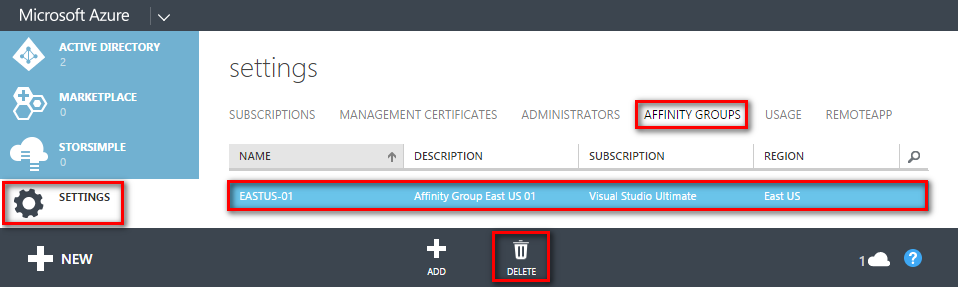
- Sing in to your Microsoft Azure Portal
- In the left navigation pane select Settings
- Click on Affinity Groups in the top navigation bar
- Click on the name of the Affinity Group and hit the Delete button
Or using PowerShell (see How to connect to Microsoft Azure using PowerShell):
Remove-AzureAffinityGroup -Name "NameOfYourAffinintyGroup"
Before you can delete an Affinity group you have to delete associations with other services as, for example, the storage service.


