



Juni 8, 2015
I’m speaking at the SharePoint Conference in Vienna!
I'm excited to speak at the SharePoint Conference in Vienna for the first time. It's the biggest German-speaking SharePoint event and takes place June 17-18 at the Eventhotel Pyramide in Vösendorf (AT). The session starts on June 18 at 9:00 AM in room 1. Here's an overview of the topic:
SharePoint 2016: Das ist neu für IT-Pros
Die nächste SharePoint Version steht in den Startlöchern. Anlässlich der Microsoft Ignite Konferenz in Chicago wurde SharePoint 2016 erstmals vorgestellt. Wir verschaffen uns einen Überblick zu On-Premise-, Hybrid- und Cloud-Szenarien. Im Zentrum stehen dabei die Funktionen und die Architektur von SharePoint 2016. Diese Session vermittelt wichtige Informationen zur nächsten SharePoint Version und schafft Entscheidungsgrundlagen für den nächsten Release.
Find all information about the SharePoint Conference in Vienna on sharepointkonferenz.at
Mai 28, 2015
Community Event: News von der Microsoft Ignite
Anlässlich der Microsoft Ignite Konferenz in Chicago wurde der SharePoint Server 2016 erstmals vorgestellt. Am 11. Juni verschaffen wir uns ab 15.00 Uhr bei Microsoft Schweiz in Wallisellen einen Überblick zu On-Premise-, Hybrid- und Cloud-Szenarien. Es hat nur noch wenige Plätze frei - jetzt kostenlos anmelden.
Im Zentrum des Events stehen die Funktionen und die Architektur von SharePoint Server 2016 sowie Neuerungen rund um Office 365. Jeder Speaker geht dabei während 25 Minuten auf ein spezifisches Thema ein:
- What’s new for IT Pros (Roger Haueter)
- Delve und Office Graph (Patrick Mäschli)
- Groups und Next Gen Portals (David Schneider)
- Hybrid Search (Samuel Zürcher)
Ein herzliches Dankeschön für die Unterstützung des Events geht an Microsoft Schweiz und AvePoint.
Über AvePoint
AvePoint ist etablierter Marktführer für Enterprise-Lösungen, die darauf ausgelegt sind, Organisationen bei ihren Digitalisierungsvorhaben zu unterstützen und Endanwendern eine einfache, sichere, reibungslose und unternehmensweite Zusammenarbeit zu ermöglichen. Mit Niederlassungen auf fünf Kontinenten und mehr als 14 Jahren Erfahrung bei der erfolgreichen Umsetzung kundenspezifischer Projekte im Enterprise-Collaboration-Umfeld, bietet AvePoint verlässliche Unternehmenslösungen, die auf die individuellen Anforderungen des jeweiligen Unternehmens ausgerichtet sind.
Mit diesen innovativen integrierten Lösungen unterstützt AvePoint Organisationen weltweit nicht nur bei der erfolgreichen Einführung von SharePoint, sondern hilft auch die Effizienz von Betriebsabläufen und die Produktivität zu steigern. Mehr als 14.000 Kunden und über 3 Millionen Office 365-Anwender vertrauen bereits auf AvePoints SharePoint-Infrastrukturmanagement-, Compliance-, Governance- und Produktivitätslösungen.
Gemeinsam mit SharePoint hat sich auch AvePoint seit Tahoe weiterentwickelt. Seit 2001 ist die Lösung für Infrastrukturmanagement für viele Unternehmen zu einem unverzichtbaren Werkzeug für die effiziente Verwaltung und Erweiterung von SharePoint als Kollaborationsplattform geworden. Auch in 2015 setzt das Unternehmen seine Tradition fort und baut die Fähigkeiten von SharePoint weiter aus, für skalierbaren Speicher, Strategien zur Sicherung von Unternehmensinhalten, weltweit verteilte Zusammenarbeit, Compliance, erfolgreiches Records- und Content-Management und ein service-orientiertes Daten-Center-Management.
AvePoint wurde vielfach für sein Engagement und seine technischen Innovationen ausgezeichnet, darunter Auszeichnungen von Deloitte (Technology Fast 500), KMWorld (100 Companies That Matter in Knowledge Management) und Microsoft als Partner of the Year 2014 im Bereich öffentliche und nationale Sicherheit. Zudem sind wir stolz, Microsoft Global Independent Software Vendor (ISV) und Gold Certified Collaboration and Content Partner zu sein.
Das Unternehmen wird in Kürze ein eigenes Büro in Zürich eröffnen. Somit können seine 90 Schweizer Kunden auch lokal durch Fachspezialisten betreut werden und gezielt auf die Anforderungen des Schweizer Marktes eingegangen werden, um den zunehmenden Bedarf zu decken.
Mai 20, 2015
Rückblick auf den Community Event in Bern «News von der Microsoft Ignite»
Nur wenige Tage nachdem die erste Microsoft Ignite Konferenz in Chicago zu Ende ging, stellte die SharePointCommunity.ch in Bern die wichtigsten Neuerungen dem interessierten Publikum vor.
Im ersten Teil des Events berichtete ich den Teilnehmern von den wichtigsten Änderungen in SharePoint Server 2016. So etwa das MinRole Konzept oder das Zero Downtime Patching. Anschliessend stellte Patrick Mäschli die Office 365 Funktionen "Delve" und "Office Graph" vor. Zum Schluss zeigte David Schneider was die Idee hinter den "Groups" ist und was die neue Generation der SharePoint Online Portals - die NextGen Portals - bringen werden.
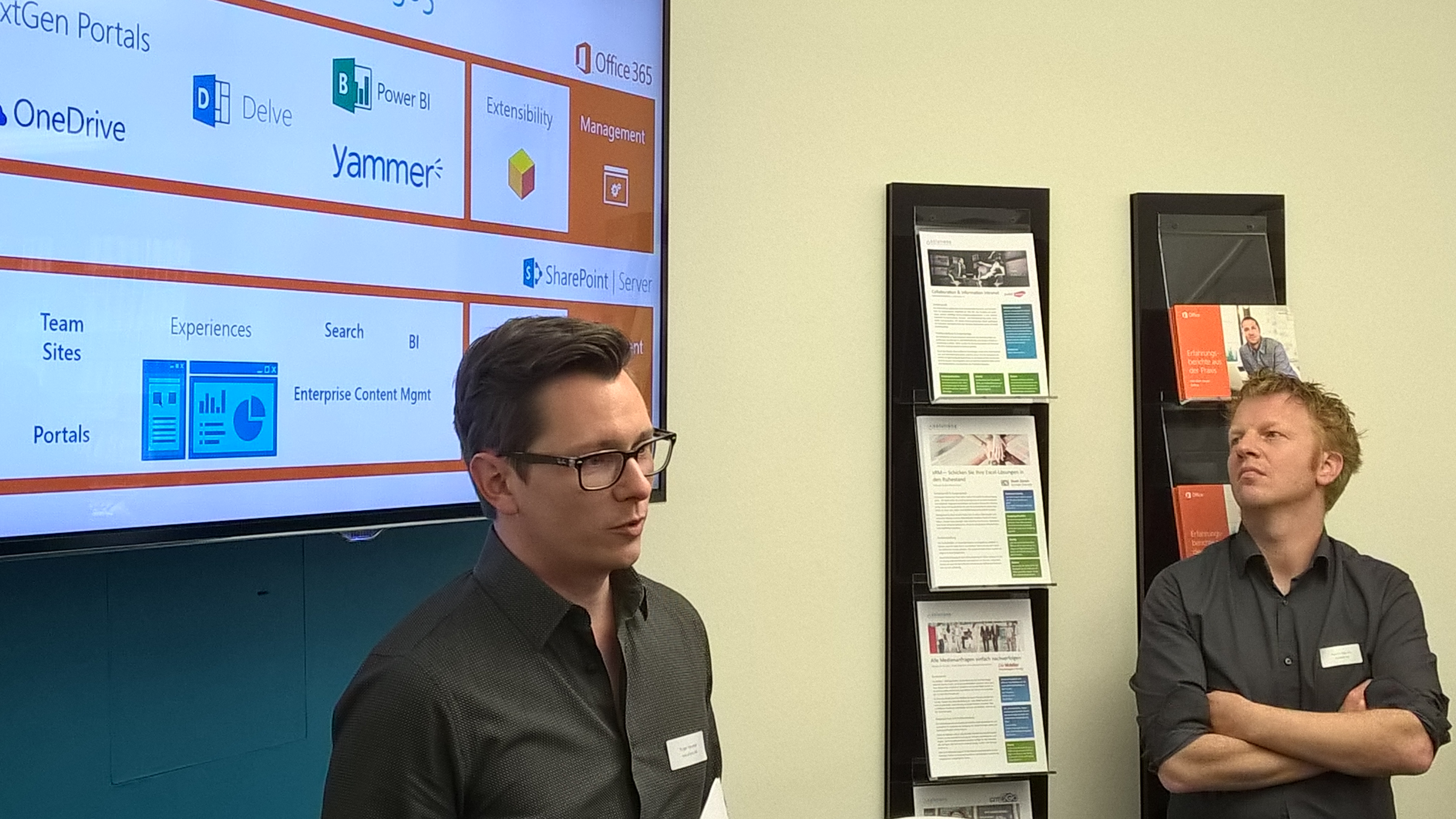
Bild: David Schneider
Und hier noch die Präsentation zu den angesprochenen Themen:
Mai 15, 2015
SharePoint 2013 Cumulative Updates: May 2015
The May 2015 Cumulative Update for SharePoint 2013 contains numerous hotfixes and improvements for SharePoint Foundation 2013 and SharePoint Server 2013. The cumulative update package is multilingual and contains updates for all languages.
Before you start
This update fixes the issue with the SharePoint 2013 Service Pack 1 build version and can be installed with both SP 2013 SP 1 releases.
Since June 2014 the Cumulative Updates for SharePoint products releases on a monthly basis.
Since May 2015 the server proofing tools are included in the cumulative updates.
This cumulative update includes all patches since the Service Pack 1 release, but not the Service Pack 1 itself. You must install the Service Pack 1 before installing this cumulative update. Read how-to install Service Pack 1.
Because of the file size the cumulative update package has been divided in three parts; ubersrv.exe, ubersrv_1.cab and ubersrv_2.cab. You have to put them all in the same folder.
Installation instructions
- Create a SharePoint Farm Backup.
- Download all SharePoint Foundation and SharePoint Server packages.
- Extract the previously downloaded files with a double-click.
- Click "Continue"
- Define the path in which you would like to extract the installation binaries and click OK. Use the same destination path for the other files.
- Run the extracted EXE file as administrator.
- Accept the license terms and click "Continue".
- Repeat the previous two steps for the other EXE files in this folder.
- Apply the updates to each SharePoint server in the farm.
- As soon as the installation of the cumulative update has finished on all servers, run the SharePoint Configuration Wizard successively on each SharePoint server in the farm.
- Restart the User Profile Service on affected servers.
Hotfix KB3039747 for SharePoint Foundation 2013: May 12, 2015
Download
Description of the SharePoint Foundation 2013 update package
Hotfix KB2965266 for SharePoint Server 2013: May 12, 2015
Download
Description of the SharePoint Server 2013 update package
Hotfix KB2965263 for Project Server 2013: May 12, 2015
Download
Description of the SharePoint Server 2013 with Project Server 2013 update package
Hotfix KB2965306 for Office Web Apps Server 2013: May 12, 2015
Download
Description of the Office Web Apps Server 2013 update package
This is a security fix, please refer to SharePoint updates are no longer available through Windows Update
SharePoint 2013 update portal
http://technet.microsoft.com/en-us/sharepoint/ee748587.aspx
Mai 15, 2015
SharePoint 2010 Cumulative Updates: May 2015
The May 2015 Cumulative Update for SharePoint 2010 contains numerous hotfixes and improvements for SharePoint Foundation 2010 and SharePoint Server 2010. The cumulative update package is multilingual and contains updates for all languages.
Before you start
Since June 2014 the Cumulative Updates for SharePoint products releases on a monthly basis!
Be aware that the cumulative update requires the Service Pack 2 to be installed. This Cumulative Update does not support Service Pack 1. The SharePoint Server 2010 cumulative update contains all resources of SharePoint Foundation 2010 since the release of Service Pack 2.
If you install the Project Server 2010 hotfixes, you also have to install the SharePoint Server 2010 hotfix.
Installation instructions
- Make sure you already installed and configured the Service Pack 2.
- Create a SharePoint Farm Backup.
- Download all SharePoint Foundation and SharePoint Server packages.
- Extract the previously downloaded files with a double-click.
- Click "Continue"
- Define the path in which you would like to extract the installation binaries and click OK. Use the same destination path for the other files.
- Run the extracted EXE file as administrator.
- Accept the license terms and click "Continue".
- Repeat the previous two steps for the other EXE files in this folder.
- Apply the updates to each SharePoint server in the farm.
- As soon as the installation of the cumulative update has finished on all servers, run the SharePoint Configuration Wizard successively on each SharePoint server in the farm.
- Restart the User Profile Service on affected servers.
Hotfix KB3017815 for SharePoint Foundation 2010: May 12, 2015
Download
Description of the SharePoint Foundation 2010 update package
This is a security fix, please refer to SharePoint updates are no longer available through Windows Update
Hotfix KB3015569 for SharePoint Server 2010: May 12, 2015
Download
Description of the SharePoint Server 2010 update package
Hotfix KB2999496 for Project Server 2010: May 12, 2015
Download
Description of the Project Server 2010 update package
Update Portal für SharePoint 2010
http://technet.microsoft.com/en-us/sharepoint/ff800847.aspx