
Das war der erste Event der SharePoint Community Zürich

Am 17. Juni gab die SharePoint Community Zürich - vertreten durch Patrick Mäschli, David Schneider und mich - ihr Debüt und ging dabei auf ein viel diskutiertes Thema ein. Mit seinem Vortrag "7 Gründe warum ihr Unternehmen Social Collaboration einsetzen muss!" griff Pascal Grossniklaus, CEO der isolutions ag, heiss diskutierte Fragen auf: Was ist der Nutzen für ihr Unternehmen? Macht Social Collaboration wirklich produktiver oder ist es nur eine nette Spielerei? Mit der gewohnten Leichtigkeit zeigte er auf, wie Yammer und Co. richtig eingesetzt werden, um einen messbaren Mehrwert zu erzeugen. Seine Ausführungen untermauerte er mit spannenden Beispielen aus der Praxis.

Für den 1. Community Event stellte uns Microsoft Schweiz das begehrte Microsoft Briefing Center in Wallisellen zur Verfügung (vielen Dank!). Nebst den grosszügig und modern gestalteten Räumlichkeiten beeindruckten die Teilnehmer auch der riesige Touch Screen und die Tech Bar mit den neusten Windows Devices. Mit 20 Teilnehmern aus der ganzen Schweiz und einem gut durchmischten Publikum - welches vom Entwickler, über den IT-Pro bis hin zu Vertretern aus dem Management reichte - war die Veranstaltung ein gelungener Auftakt der uns motiviert, weitere kostenlose Tech Events in Zürich durchzuführen.

Vielen Dank auch an unseren Sponsor AvePoint, der für das leibliche Wohl der Teilnehmer gesorgt hat.

[gview file="https://www.techtask.com/wp-content/uploads/2014/07/7-reasons-for-social-collaboration.pdf"]


2014-06-17 16.40.53

2014-06-17 16.41.03

2014-06-17 16.46.03

2014-06-17 17.00.52

2014-06-17 17.51.20

2014-06-17 18.35.38


SharePoint 2013 Cumulative Updates: June 2014

Die deutschsprachige Version dieses Artikels finden Sie hier.

The June 2014 Cumulative Update for SharePoint 2013 contains numerous hotfixes and improvements for SharePoint Foundation 2013 and SharePoint Server 2013. The cumulative update package is multilingual and contains updates for all languages.

Before you begin
Be aware that the cumulative update requires the March Public Upate für SharePoint 2013 or Service Pack 1 to be installed first.
Install the SharePoint Server 2013 March Public Update and the SharePoint Server 2013 cumulative update if you're using SharePoint Server 2013. The SharePoint Server 2013 cumulative update contains all ressources of SharePoint Foundation 2013.
Install the SharePoint Foundation 2013 March Public Update and the SharePoint Foundation 2013 cumulative update if you're using SharePoint Foundation 2013.
Please note, there's something new coming with this release: Because of the file size the cumulative update package has been devided in three parts; ubersrv.exe, ubersrv_1.cab and ubersrv_2.cab. You have to put them all in the same folder.

Installation instruction

  • Make sure you already installed and configured the March Public Update for SharePoint 2013 or the Service Pack 1.
  • Create a SharePoint Farm Backup.
  • Download all three files (ubersrv.exe, ubersrv_1.cab and ubersrv_2.cab). Make sure you put them in the same folder.
  • Extract the previously downloaded files with a double-click.
  • Click "Continue"
  • Define the path in which you would like to extract the installation binaries and click OK. Use the same destination path for the other files.
  • Please check: You should now have to files in your destination folder: ubersrv.exe, ubersrv_1.cab and ubersrv_2.cab.
  • Run the ubersrv.exe as administrator.
  • Accept the license terms and click "Continue".
  • Apply the cumulative update to each SharePoint server in the farm.
  • As soon as the installation of the cumulative update has finished on all servers, run the SharePoint Configuration Wizard successively on each SharePoint server in the farm.
  • Restart the User Profile Service on affected servers.

SharePoint Foundation 2013 Cumulative Update: June 10, 2014
Download
Description of the SharePoint Foundation 2013 cumulative update package

SharePoint Server 2013 Cumulative Update: June 10, 2014
Download
Description of the SharePoint Server 2013 cumulative update package

SharePoint Server 2013 with Project Server 2013 Cumulative Update: June 10, 2014
Download
Description of the SharePoint Server 2013 with Project Server 2013 cumulative update package

Office Web Apps 2013 Cumulative Update: June 10, 2014
Download
Description of the Office Web Apps Server 2013 cumulative update package

SharePoint 2013 update portal
http://technet.microsoft.com/en-us/sharepoint/ee748587.aspx

---

Deutschsprachige Version des Artikels

Das kumulative SharePoint 2013 Update Paket für Juni 2014 enthält eine Vielzahl an Hotfixes und Verbesserungen für SharePoint Foundation 2013 resp. SharePoint Server 2013. Das kumulative Update Paket ist mehrsprachig (multilingual) und enthält die entsprechenden Updates für alle Sprachen.

Gut zu wissen
Bevor ein Cumulative Update für SharePoint 2013 installiert werden kann, muss zwingend das March Public Upate für SharePoint 2013 installiert sein.
Wenn Sie SharePoint Server 2013 im Einsatz haben, dann installieren Sie das SharePoint Server 2013 March Public Update sowie das SharePoint Server 2013 Cumulative Update. Das SharePoint Server 2013 Cumulative Update beinhaltet neu auch alle Ressourcen von SharePoint Foundation 2013.
Nutzen Sie SharePoint Foundation 2013, dann installieren Sie das SharePoint Foundation 2013 March Public Update sowie das SharePoint Foundation 2013 Cumulative Update.
Achtung! Ab diesem Cumulative Updates gibt es eine Änderung: Weil die Cumulative Updates stetig wachsen, wurden diese in drei Dateien gesplittet ubersrv.exe, ubersrv_1.cab und ubersrv_2.exe. Es müssen alle Dateien heruntergeladen werden.

Installationsanleitung

  • Stellen Sie sicher, dass das March Public Update für SharePoint 2013 oder das Service Pack 1 installiert ist.
  • Erstellen Sie vor der Installation des Cumulative Updates ein SharePoint Farm Backup
  • Laden Sie die drei Dateien (ubersrv.exe, ubersrv_1.cab und ubersrv_2.cab) herunter.
  • Entpacken Sie die heruntergeladenen Dateien, indem Sie diese mit einem Doppelklick ausführen.
  • Klicken Sie auf Continue
  • Geben Sie einen Pfad an, in den die Installationsdateien entpackt werden sollen und klicken OK. Geben Sie für alle Dateien den gleichen Pfad an.
  • Bitte prüfen: In ihrem Ordner sollten jetzt zwei Dateien liegen; ubersrv_1.cab und ubersrv.exe.
  • Führen Sie ubersrv.exe mit administrativen Rechten aus.
  • Akzeptieren Sie die Lizenzvereinbarung und klicken Sie auf Continue.
  • Wiederholen Sie die Installation des Cumulative Updates auf jedem SharePoint Server in der Farm.
  • Sobald die Cumulative Updates auf allen Servern installiert wurden, führen Sie nacheinander auf jedem SharePoint Server den SharePoint Configuration Wizard aus.
  • Starten Sie auf den betroffenen Servern den User Profile Service neu.

SharePoint Foundation 2013 Cumulative Update: June 10, 2014
Download
Beschreibung des SharePoint Foundation 2013 Cumulative Update Pakets

SharePoint Server 2013 Cumulative Update: June 10, 2014
Download
Beschreibung des SharePoint Server 2013 Cumulative Update Pakets

SharePoint Server 2013 with Project Server 2013 Cumulative Update: June 10, 2014
Download
Beschreibung des SharePoint Server 2013 with Project Server 2013 cumulative update package

Office Web Apps 2013 Cumulative Update: June 10, 2014
Download
Beschreibung des Office Web Apps Server 2013 Cumulative Update Pakets

Update Portal für SharePoint 2013
http://technet.microsoft.com/en-us/sharepoint/ee748587.aspx


SharePoint 2010 Cumulative Updates: June 2014

Das kumulative SharePoint 2010 Update Paket für Juni 2014 enthält eine Vielzahl an Hotfixes und Verbesserungen für SharePoint Foundation 2010 resp. SharePoint Server 2010. Das kumulative Update Paket ist mehrsprachig (multilingual) und enthält die entsprechenden Updates für alle Sprachen.

Gut zu wissen
Microsoft hat per 31. August 2011 die Pakete der Cumulative Updates angepasst.
Wenn Sie SharePoint Server 2010 im Einsatz haben, dann installieren Sie direkt das SharePoint Server 2010 Cumulative Update. Dieses beinhaltet neu auch alle Ressourcen von SharePoint Foundation 2010.
Nutzen Sie SharePoint Foundation 2010, dann installieren Sie wie bisher nur das SharePoint Foundation 2010 Cumulative Update.
Vor der Installation dieses Cumulative Updates sollte das Service Pack 2 installiert worden sein, mindestens jedoch das Service Pack 1.

Installationsanleitung

  • Erstellen Sie vor der Installation des Cumulative Updates ein SharePoint Farm Backup
  • Doppelklicken Sie auf die heruntergeladene EXE-Datei (z.B. 476047_intl_x64_zip.exe)
  • Klicken Sie auf Continue
  • Geben Sie einen Pfad an, in den die Installationsdateien entpackt werden sollen und klicken OK
  • Navigieren Sie zum angegebenen Pfad und führen Sie die neu entpackte EXE-Datei (z.B. ubersrv2010-kb2825786-fullfile-x64-glb.exe) mit administrativen Rechten aus.
    Achtung beim Verschieben: Neben der EXE-Datei wird auch eine Datei mit dem Namen ubersrv_1.cab entpackt. Beide Dateien müssen im gleichen Verzeichnis liegen.
  • Wiederholen Sie die Installation des Cumulative Updates auf jedem SharePoint Server in der Farm.
  • Sobald die Cumulative Updates auf allen Servern installiert wurden, führen Sie nacheinander auf jedem SharePoint Server den SharePoint Configuration Wizard aus.
  • Starten Sie auf den betroffenen Servern den User Profile Service neu.

SharePoint Foundation 2010 Cumulative Update: June 10, 2014
Download
Beschreibung des SharePoint Foundation 2010 Cumulative Update Pakets

SharePoint Server 2010 Cumulative Update: June 10, 2014
Download
Beschreibung des SharePoint Server 2010 Cumulative Update Pakets

SharePoint Server 2010 with Project Server 2010 Cumulative Update: June 10, 2014
Download
Beschreibung des Project Server 2010 Cumulative Update Pakets

Update Portal für SharePoint 2010
http://technet.microsoft.com/en-us/sharepoint/ff800847.aspx


SharePoint 2013 Newsfeed picture upload failed

When I tried to post a picture using the small camera icon in the Newsfeed webpart, on a site which is located in a different Web Application than the MySite, I got this error: Sorry, this site hasn't been shared with you.
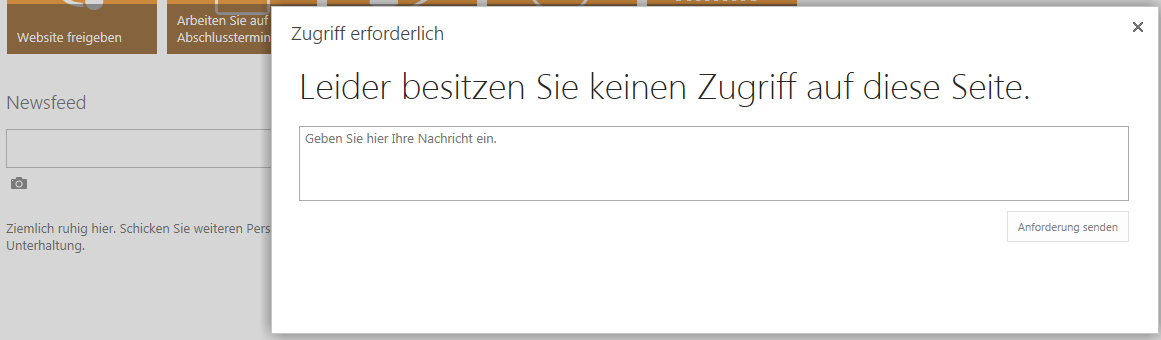
20140428

The explanation for this manner is quite simple: When you try to upload a picture to the Newsfeed from another Web Application, the corresponding application pool user needs access to the MySite Web Application. You can set the correct permissions using the SharePoint Management Shell:

$WebApp = Get-SPWebApplication "https://MySite.domain.com"
$WebApp.GrantAccessToProcessIdentity("domain\PortalUser")

Where "https:/MySite.domain.com" is the MySite Host and "domain\PortalUser" is the service account of Web Application which is hosting the site from which you try to upload the picture.


SharePoint 2013 Cumulative Updates: April 2014

Die deutschsprachige Version dieses Artikels finden Sie hier.

The April 2014 Cumulative Update for SharePoint 2013 contains numerous hotfixes and improvements for SharePoint Foundation 2013 and SharePoint Server 2013. The cumulative update package is multilingual and contains updates for all languages.

Before you begin
Be aware that the cumulative update requires the March Public Upate for SharePoint 2013 or Service Pack 1 to be installed first.
Install the SharePoint Server 2013 March Public Update and the SharePoint Server 2013 cumulative update if you're using SharePoint Server 2013. The SharePoint Server 2013 cumulative update contains all ressources of SharePoint Foundation 2013.
Install the SharePoint Foundation 2013 March Public Update and the SharePoint Foundation 2013 cumulative update if you're using SharePoint Foundation 2013.
Attention, there's something new coming with this release: Because of the file size the cumulative update package has been devided in three parts; ubersrv.exe, ubersrv_1.cab and ubersrv_2.cab. You have to put them all in the same folder.

Installation instruction

  • Make sure you already installed and configured the March Public Update for SharePoint 2013 or the Service Pack 1.
  • Create a SharePoint Farm Backup.
  • Download all three files (ubersrv.exe, ubersrv_1.cab and ubersrv_2.cab). Make sure you put them in the same folder.
  • Extract the previously downloaded files with a double-click.
  • Click "Continue"
  • Define the path in which you would like to extract the installation binaries and click OK. Use the same destination path for the other files.
  • Please check: You should now have to files in your destionation folder: ubersrv.exe, ubersrv_1.cab and ubersrv_2.cab.
  • Run the ubersrv.exe as administrator.
  • Accept the license terms and click "Continue".
  • Apply the cumulative update to each SharePoint server in the farm.
  • As soon as the installation of the cumulative update has finished on all servers, run the SharePoint Configuration Wizard successively on each SharePoint server in the farm.
  • Restart the User Profile Service on affected servers.

SharePoint Foundation 2013 Cumulative Update: May 7, 2014
Download
Description of the SharePoint Foundation 2013 cumulative update package

SharePoint Server 2013 Cumulative Update: May 7, 2014
Download
Description of the SharePoint Server 2013 cumulative update package

SharePoint Server 2013 with Project Server 2013 Cumulative Update: May 7, 2014
Download
Description of the SharePoint Server 2013 with Project Server 2013 cumulative update package

Office Web Apps 2013 Cumulative Update: April 8, 2014
Download
Description of the Office Web Apps Server 2013 cumulative update package

SharePoint 2013 update portal
http://technet.microsoft.com/en-us/sharepoint/ee748587.aspx

---

Deutschsprachige Version des Artikels

Das kumulative SharePoint 2013 Update Paket für April 2014 enthält eine Vielzahl an Hotfixes und Verbesserungen für SharePoint Foundation 2013 resp. SharePoint Server 2013. Das kumulative Update Paket ist mehrsprachig (multilingual) und enthält die entsprechenden Updates für alle Sprachen.

Gut zu wissen
Bevor ein Cumulative Update für SharePoint 2013 installiert werden kann, muss zwingend das March Public Upate für SharePoint 2013 installiert sein.
Wenn Sie SharePoint Server 2013 im Einsatz haben, dann installieren Sie das SharePoint Server 2013 March Public Update sowie das SharePoint Server 2013 Cumulative Update. Das SharePoint Server 2013 Cumulative Update beinhaltet neu auch alle Ressourcen von SharePoint Foundation 2013.
Nutzen Sie SharePoint Foundation 2013, dann installieren Sie das SharePoint Foundation 2013 March Public Update sowie das SharePoint Foundation 2013 Cumulative Update.
Achtung! Ab diesem Cumulative Updates gibt es eine Änderung: Weil die Cumulative Updates stetig wachsen, wurden diese in drei Dateien gesplittet ubersrv.exe, ubersrv_1.cab und ubersrv_2.exe. Es müssen alle Dateien heruntergeladen werden.

Installationsanleitung

  • Stellen Sie sicher, dass das March Public Update für SharePoint 2013 oder das Service Pack 1 installiert ist.
  • Erstellen Sie vor der Installation des Cumulative Updates ein SharePoint Farm Backup
  • Laden Sie die drei Dateien (ubersrv.exe, ubersrv_1.cab und ubersrv_2.cab) herunter.
  • Entpacken Sie die heruntergeladenen Dateien, indem Sie diese mit einem Doppelklick ausführen.
  • Klicken Sie auf Continue
  • Geben Sie einen Pfad an, in den die Installationsdateien entpackt werden sollen und klicken OK. Geben Sie für alle Dateien den gleichen Pfad an.
  • Bitte prüfen: In ihrem Ordner sollten jetzt zwei Dateien liegen; ubersrv_1.cab und ubersrv.exe.
  • Führen Sie ubersrv.exe mit administrativen Rechten aus.
  • Akzeptieren Sie die Lizenzvereinbarung und klicken Sie auf Continue.
  • Wiederholen Sie die Installation des Cumulative Updates auf jedem SharePoint Server in der Farm.
  • Sobald die Cumulative Updates auf allen Servern installiert wurden, führen Sie nacheinander auf jedem SharePoint Server den SharePoint Configuration Wizard aus.
  • Starten Sie auf den betroffenen Servern den User Profile Service neu.

SharePoint Foundation 2013 Cumulative Update: May 7, 2014
Download
Beschreibung des SharePoint Foundation 2013 Cumulative Update Pakets

SharePoint Server 2013 Cumulative Update: May 7, 2014
Download
Beschreibung des SharePoint Server 2013 Cumulative Update Pakets

SharePoint Server 2013 with Project Server 2013 Cumulative Update: May 7, 2014
Download
Beschreibung des SharePoint Server 2013 with Project Server 2013 cumulative update package

Office Web Apps 2013 Cumulative Update: April 8, 2014
Download
Beschreibung des Office Web Apps Server 2013 Cumulative Update Pakets

Update Portal für SharePoint 2013
http://technet.microsoft.com/en-us/sharepoint/ee748587.aspx